My Server Has No SSH Port. It Also Had No Disk Space.
A follow-up nobody asked for, starring a t3.micro, a full disk, and the IDE that ate it.
Back in June I wrote about closing port 22 on my personal server and getting in through an identity broker instead. Nothing to scan, nothing to brute-force, every session logged. I was quite pleased with myself.
This is the post where the house fills up with boxes and I find out that a building with no door is also surprisingly hard to get back into.
The bill
The setup is small. One t3.micro in Stockholm, Ubuntu, a 10 GB disk, host nginx in front and a couple of nginx:alpine containers serving static HTML behind it. My napkin math said about $12 a month.
Cost Explorer said $33 for September, and $37 for October with four days still to go.
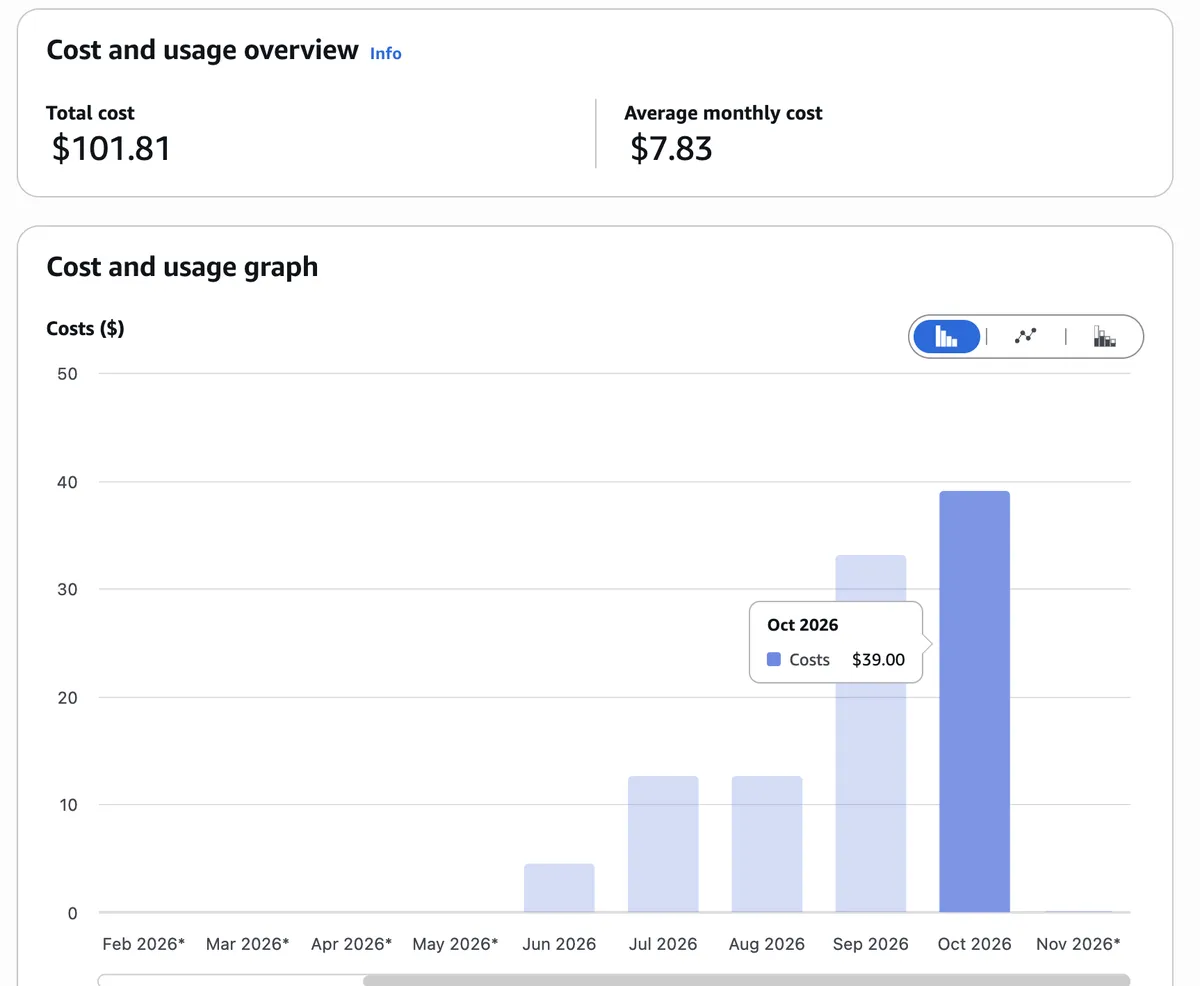 Total for a static website: $101.81. Average monthly cost: $7.83, the kind of average that hides a problem.
Credits were absorbing all of it, which is the only reason this is a funny post.
Cost Anomaly Detection had actually caught it: three spikes in September, all on a usage type called EUN1-CPUCredits:t3. Translation: T3 instances launch in unlimited credit mode by default. Run above the baseline (10% per vCPU on a micro) and AWS doesn't throttle you, it bills you. Quietly, per vCPU-hour.
It also turned out my anomaly alert subscription was set to "$100 AND 40%". On an account that costs $12 a month, that alert fires roughly when the bill doubles and then buys a boat. It's $3 now.
The immediate fix is one call:
aws ec2 modify-instance-credit-specification \
  --instance-credit-specification "InstanceId=i-xxxxxxxx,CpuCredits=standard"
Standard mode throttles instead of billing. Your site gets slow before your card gets sad.
Which left the actual question: what was a static website doing with the CPU?
Locked out
While I was poking at that, SSM stopped letting me in.
$ aws ssm start-session --target i-xxxxxxxx

Starting session with SessionId: jim-xxxxxxxx

SessionId: jim-xxxxxxxx : Plugin with name Standard_Stream not found. Step name: Standard_Stream
The agent reported Online. Run Command failed. A reboot changed nothing. The error mentions a plugin, the agent on Ubuntu ships as a snap, snaps auto-update... clearly a bad agent update. My AI assistant and I agreed on this immediately, which in hindsight should have worried me. We wrote a tidy little user-data script to roll the snap back, I stopped the instance, pasted it in, started it again.
Nothing.
The log that just said it
EC2 → Monitor and troubleshoot → Get system log. Two hundred lines of systemd being happy, then cloud-init:
[    8.066740] cloud-init[529]: /var/log/cloud-init-output.log: No space left on device (os error 28)
[    8.162302] cloud-init[529]: main.py[ERROR]: failed stage init
[    8.170980] cloud-init[529]: OSError: [Errno 28] No space left on device
...
[FAILED] Failed to start docker.service - Docker Application Container Engine.
...
2026/10/27 17:59:10Z: Amazon SSM Agent v3.3.4793.0 is running
That last line is my favourite. The agent is running. It just can't do anything.
The disk was full. Not nearly full. Full enough that cloud-init couldn't write my recovery script to disk before running it. Full enough that the SSM session worker couldn't create its own temp files, which it reports, naturally, as a missing plugin. Docker had failed to start as well, so the site was serving 502s to an audience of nobody at a cost of $39 a month.
Read the log before you write the fix. I know this. I teach this. Anyway.
Getting back in without a door
The obvious move is a bigger disk. EBS volumes grow online, so 10 GB to 20 GB is one click, and cloud-init grows the filesystem on the next boot.
Except cloud-init crashes on the full disk before it reaches the step that grows the filesystem. The box can't fix itself, because fixing itself needs a few bytes of free space.
So, the oldest trick there is: a rescue instance.
- Stop the instance and detach the root volume.
- Launch a throwaway instance from the same AMI, so its disk tools match the broken filesystem.
- Attach the volume as
/dev/sdfand open an SSM session on the rescue box.
sudo growpart /dev/nvme1n1 1
sudo mount /dev/nvme1n1p1 /mnt/old
sudo resize2fs /dev/nvme1n1p1           # online grow, no fsck dance
sudo du -xh /mnt/old --max-depth=3 | sort -h | tail
And there it was:
404M    /mnt/old/var/log
1.3G    /mnt/old/usr/lib
2.5G    /mnt/old/usr
4.5G    /mnt/old/home/ubuntu/.vscode-server
8.6G    /mnt/old
More than half the disk was the VS Code Remote server: a Node runtime, every extension, and a couple of old versions it keeps around for sentimental reasons. I'd connected my editor to the box a few times to "quickly fix some HTML". The HTML file is 14 KB. The tooling to edit it was 4.5 GB, and I'm fairly sure its Node processes were also what burned the CPU credits on a 1 GB machine.
So my static site cost three times what it should and then locked me out of itself, and the culprit was the editor I used to look after it.
One honest footnote: I fat-fingered the unmount ($ $ sudo umount is not a command), so I stopped the rescue instance before detaching. A clean shutdown unmounts and flushes everything. Detaching a still-mounted ext4 volume is how a bad evening becomes a ruined weekend.
Reattach as /dev/sda1, start, curl: 200 OK. Nobody noticed it had been down, which says a lot about my traffic.
Making sure it stays boring
The cleanup: delete .vscode-server, vacuum the journal and cap it, apt-get clean, tell snapd to keep fewer old revisions, and move my GoAccess dashboard from every 60 seconds to every 15 minutes. It re-parses the full access log on every run, and nobody needs per-minute analytics for an audience this exclusive.
# /etc/systemd/journald.conf.d/size.conf
[Journal]
SystemMaxUse=200M
Then an alert, because "the disk filled up and I found out from an SSM error" is not a monitoring strategy. A systemd timer runs this hourly and emails me through SNS above 80%, at most once a day (cooldown logic trimmed here):
usage=$(df --output=pcent / | tail -1 | tr -dc '0-9')
(( usage < THRESHOLD )) && exit 0
aws sns publish --topic-arn "$TOPIC_ARN" \
  --subject "Disk ${usage}% full on $(hostname)" \
  --message "$(df -h /; du -xh / --max-depth=2 2>/dev/null | sort -h | tail)"
Ten years ago a snippet like this came from a forum post by someone called kernel_wizard_77, last edited in 2011, and you ran it as root with one eye closed. Today Claude writes it in four seconds. You should still read it. See the previous section for why.
The instance role can call sns:Publish on exactly one topic and nothing else. And there's now a $1 budget that counts credits, so it sits at zero until the day real money leaves my card.
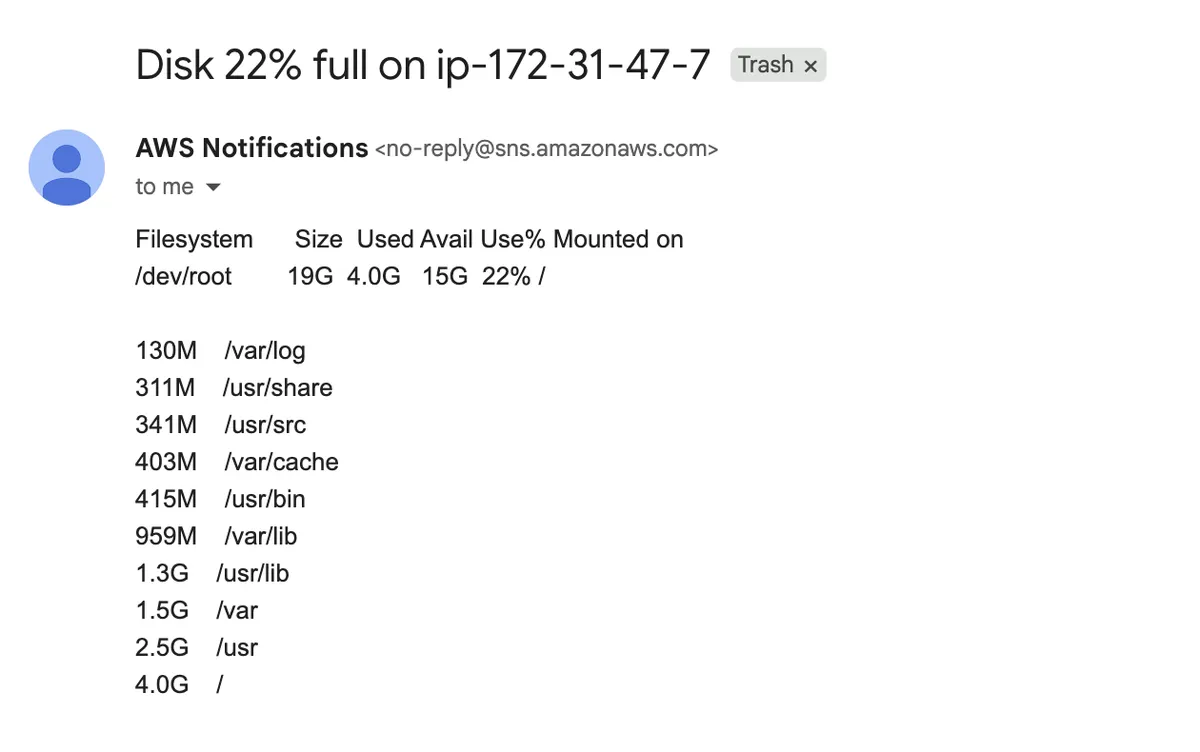 The test alert, forced with
THRESHOLD=1. The real one waits for 80%.
What I'm keeping
The door stays closed. The whole recovery ran through the EC2 API, a rescue instance and SSM on a different box. No port 22, no keys pasted anywhere, every step in CloudTrail. Identity-brokered access held up fine. What I hadn't planned for is that it depends on the host being healthy enough to write a temp file. Your break-glass path has to work from outside the box: volumes, snapshots, the API. Mine did, but I only found that out by needing it.
Dev tooling on a server is part of the server. Nobody threat-models their IDE's remote agent, but mine quietly installed a runtime, a pile of extensions and gigabytes of state onto a public-facing machine, under my identity. Here it only filled the disk. It's still unvetted software on prod, and I'd flag it in anyone else's review.
Size alerts to the account you have. A $100 threshold on a $12 account is decoration.
Read the log first. Still working on that one.
The server still has no SSH port. It now has 15 GB free, a disk alert, and one fewer IDE.